The CPU in Action: Mastering the Fetch-Decode-Execute Cycle
The grand finale of our architecture series. Follow a step-by-step walkthrough of the Fetch-Decode-Execute cycle to see how the ALU, Control Unit, and Registers create a thinking machine.
Up to now, we’ve looked at the main pieces of the CPU separately: the ALU, the control unit, and the registers.
In this chapter, we bring everything together and see how they actually cooperate to run a program. This is where the CPU stops being a set of parts and becomes a machine that thinks in a very mechanical way.
Bringing it all together
A CPU is essentially a loop: it constantly fetches instructions from memory, interprets them, and performs the required actions.
Here’s how the major components play their roles:
Registers
These are tiny, ultra-fast storage slots inside the CPU. They hold:
- the current instruction (IR)
- the next instruction’s address (PC or IP)
- operands for the ALU
- results produced by the ALU
- temporary values the control unit needs
ALU (Arithmetic Logic Unit)
The ALU performs mathematical operations (like addition or subtraction) and logical operations (like AND, OR, or comparison).
It does nothing on its own; it is activated only when the control unit tells it to.
Control Unit
This is the “orchestrator.” It:
- reads machine instructions
- decodes what they mean
- activates the right circuits (ALU, registers, memory access paths)
- manages timing so each step happens in the correct order
You can imagine it as the conductor of an orchestra. Without it, the ALU and registers just sit there with nothing to do.
When all three work together, the CPU becomes a general-purpose engine that can run any program expressed in machine code.
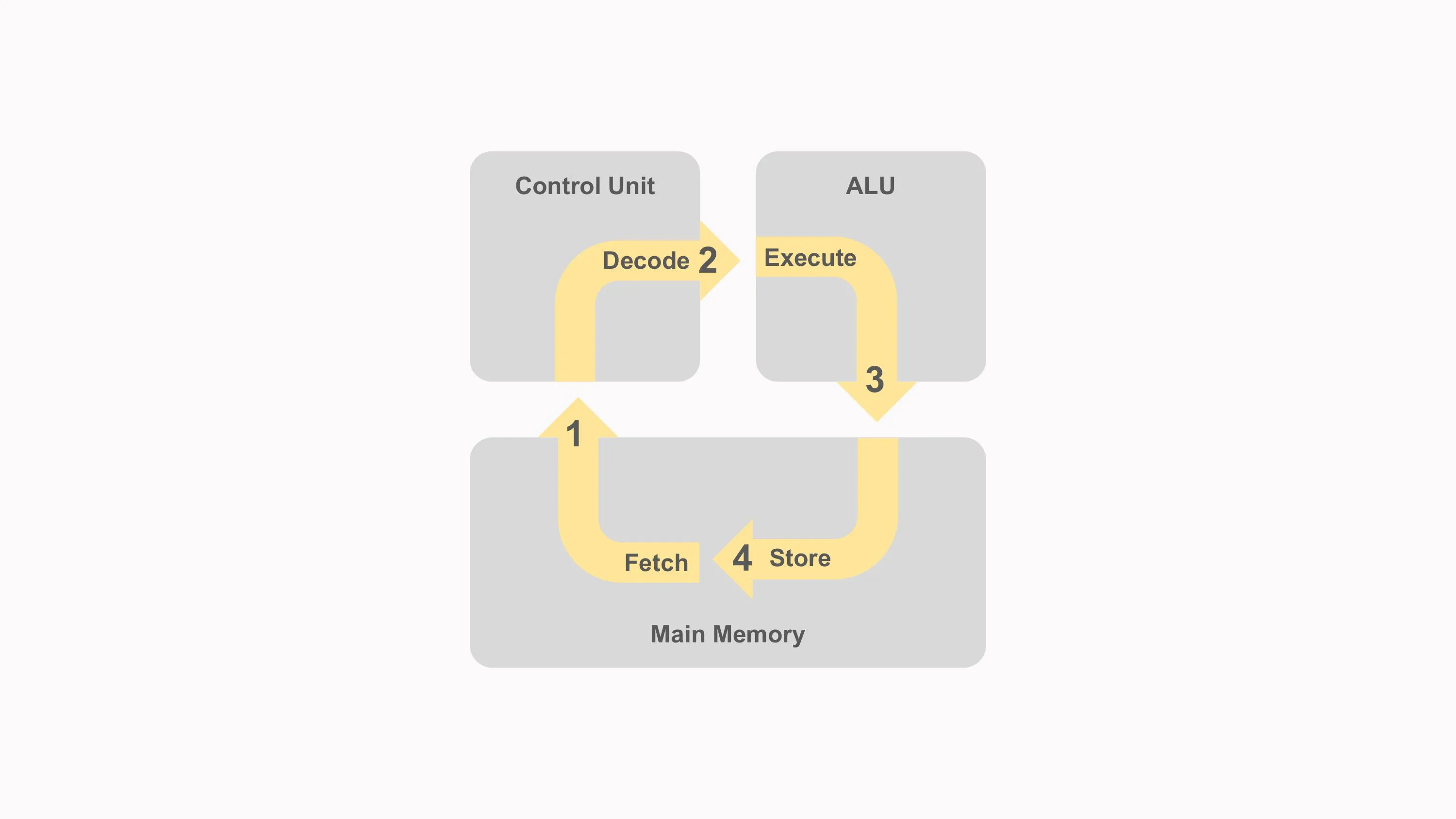
The Instruction Cycle (Fetch → Decode → Execute)
Every CPU instruction follows the same high-level process called the instruction cycle:
1. Fetch
The control unit loads the next instruction from memory into the Instruction Register (IR).
- The Program Counter (PC) holds the address of that instruction.
- After fetching, the PC is incremented to point to the next one.
2. Decode
The control unit examines the bits of the instruction to figure out:
- What operation it represents (e.g., ADD, LOAD, JUMP)
- Which registers are involved
- Whether a memory address or an immediate value is needed
- What signals must be sent to the ALU, registers, and buses
This is where microcode (if used) may step in to guide complex instructions.
3. Execute
The CPU performs the required action.
This may involve:
- doing arithmetic in the ALU
- moving data between registers
- loading from or storing to memory
- updating flags in the status register
- changing the PC (for jumps and branches)
Some instructions also include a write-back phase, where the result is stored in the destination register.
After execution finishes, the cycle repeats with the next instruction, billions of times per second.
Example Walkthrough: Executing a Simple Instruction
Let’s break down a simple machine instruction:
ADD R1, R2, R3Meaning: R1 = R2 + R3
Here’s how the CPU performs it:
Step 1: Fetch
- The PC holds the address of the
ADDinstruction in memory. - The control unit loads this instruction into the Instruction Register (IR).
- The PC increments to point to the next instruction.
Step 2: Decode
The control unit decodes the bits stored in IR:
- operation → ADD
- source registers → R2 and R3
- destination register → R1
- ALU operation needed → addition
The control unit now prepares the ALU and registers.
Step 3: Execute
- The values inside registers R2 and R3 are sent to the ALU’s input lines.
- The ALU performs the addition.
- The result is placed on the CPU’s internal data bus.
- The control unit writes the result into register R1.
- The ALU updates the flags register (Zero, Carry, Overflow, etc.) if needed.
Step 4: Continue
The CPU goes back to the fetch stage, now using the updated PC to load the next instruction.
This process repeats endlessly, carrying out a program step by step.
Why This Matters
Understanding this cycle is key to comprehending how all software works, from a simple “Hello World” program to a complex video game or operating system.
Everything a computer does boils down to:
- Fetch an instruction
- Decode it
- Execute it
- Repeat
And inside that cycle, the ALU, registers, and control unit cooperate with precise timing to turn binary instructions into meaningful work.