Beyond the CPU: I/O, Buses, and Multicore Systems
Discover how CPUs talk to the outside world. Learn about memory-mapped I/O, DMA, the role of GPUs in parallel processing, and modern System-on-Chip (SoC) design.
By now, we have taken a deep look inside the CPU. We’ve seen how instructions are fetched, decoded, and executed, how registers and memory work together, and how the ALU performs calculations under the control of carefully timed signals.
But a CPU by itself is not very useful. A computer becomes powerful only when the CPU can communicate with the outside world, store data permanently, and share work with other processing units. In this chapter, we step beyond the CPU and look at the larger system that surrounds it.
The CPU Is Not Alone
The CPU is often called the “brain” of the computer, but even a brain cannot function in isolation. A CPU cannot directly:
- Read keystrokes from a keyboard
- Display pixels on a screen
- Store files permanently
- Send data over a network
To do any of these things, it must work together with other hardware components. These components are connected through communication pathways and coordinated by the operating system. Together, they form a computer system, not just a processor.
Input and Output (I/O) Systems
Input/Output (I/O) refers to how a computer exchanges data with the outside world.
- Input devices send data into the system (keyboard, mouse, camera, network).
- Output devices receive data from the system (display, speakers, printer).
- Many devices, like storage and network cards, do both.
How the CPU Talks to Devices
From the CPU’s point of view, hardware devices look like special regions of memory. Each device exposes control registers that the CPU can read or write.
For example:
- Writing a value to a graphics device register might change a pixel.
- Reading a network register might return received data.
This approach is often called memory-mapped I/O. The CPU uses the same load and store instructions it already knows; it just talks to devices instead of RAM.
Polling vs. Interrupts
There are two main ways a CPU can interact with devices:
- Polling (is like a chef walking to the front door every 30 seconds to see if a customer has arrived):
The CPU repeatedly checks a device to see if it’s ready.
- Simple, but inefficient.
- Wastes CPU time if nothing happens.
- Interrupts (are like a doorbell. The chef can keep cooking until the bell rings):
The device signals the CPU when it needs attention.
- Much more efficient.
- Allows the CPU to work on other tasks meanwhile.
Modern systems rely heavily on interrupts to stay responsive.
Buses: The System’s Highways
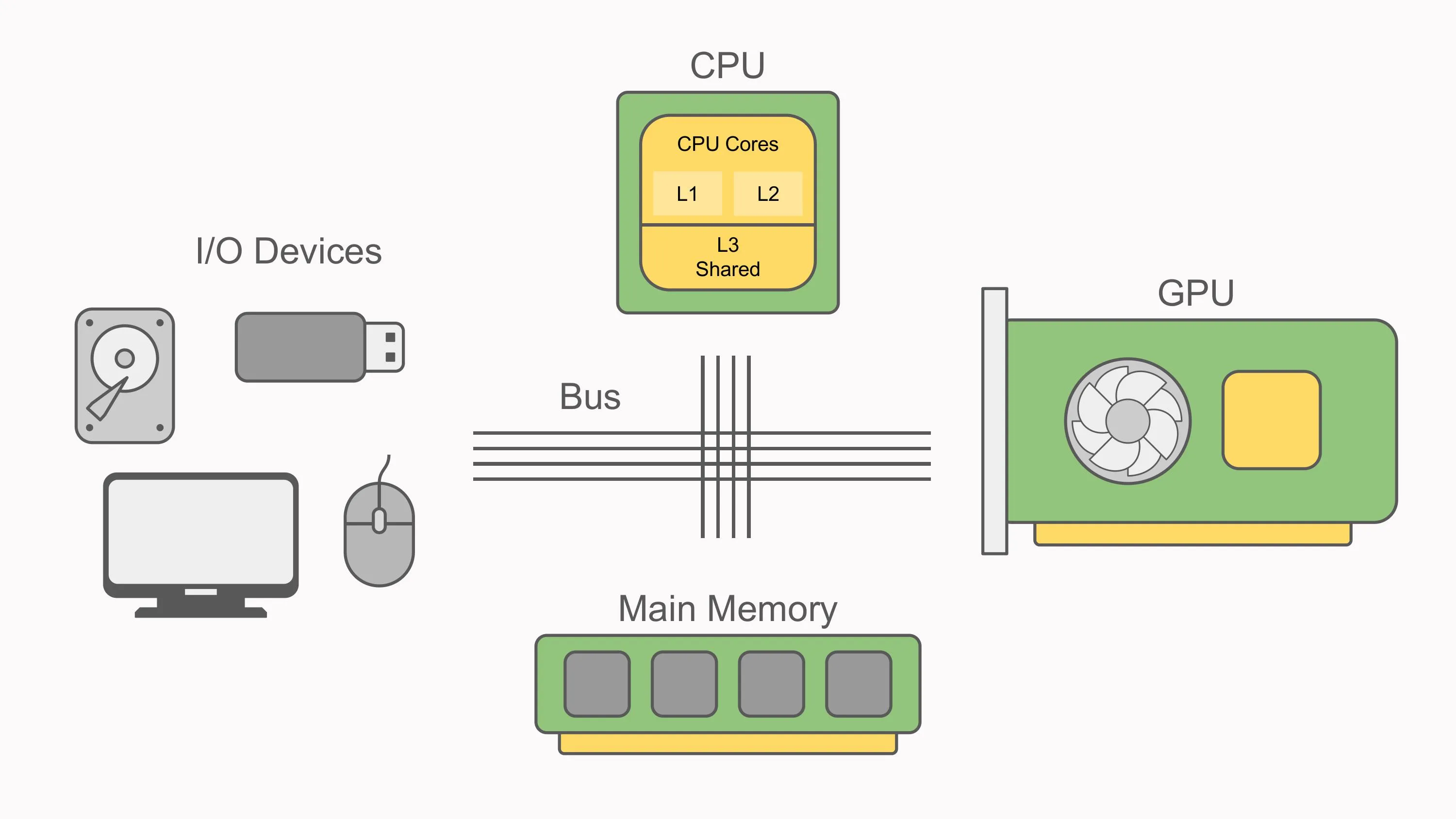
All communication inside a computer happens over buses, shared pathways that carry signals between components.
A bus typically carries three kinds of information:
- Data: the actual values being transferred
- Addresses: where the data should go. The “width” of this bus determines how much memory the CPU can “see.” For example, a 32-bit address bus can name about 4 billion unique locations, which is why many 32-bit systems are limited to around 4 GB of RAM without special techniques.
- Control signals: read, write, interrupt, and timing information
You can think of buses as highways:
- Wider highways move more data at once.
- Faster highways deliver data more quickly.
Did you know?: Modern smartphone and laptops like Apple’s M-series, often pack the CPU, GPU and RAM into a single systems-on-chip (SoC). This reduces the “highway distance” data has to travel, improving performance and energy efficiency.
Modern Interconnects
In modern computers, simple shared buses have largely been replaced by faster, point-to-point connections, such as:
- PCI Express (PCIe): used for GPUs, SSDs, and expansion cards
- Memory buses: dedicated links between CPU and RAM
The details are complex, but the idea is simple: moving data efficiently is just as important as computing it.
Peripheral Communication
Any hardware device outside the CPU and main memory is called a peripheral.
Common peripherals include:
- Storage devices
- USB devices
- Network interfaces
- Graphics cards
The Role of the Operating System
Applications do not talk to hardware directly. Instead, the operating system acts as an intermediary:
- It provides device drivers for each type of hardware.
- It presents a consistent interface to software.
- It handles errors, timing, and security.
This is why the same program can run on many different machines without knowing the details of the hardware underneath.
Direct Memory Access (DMA)
Some devices can transfer data directly to and from RAM without involving the CPU. This is called Direct Memory Access (DMA).
With DMA:
- The CPU sets up the transfer
- The device moves the data itself
- The CPU is interrupted when the transfer finishes
DMA allows high-speed devices, like SSDs and network cards, to operate efficiently without slowing down the CPU. While the device moves data, the CPU remains free to run the OS or execute programs, which is why modern systems feel responsive even during large transfers.
Multicore Processors
For many years, CPUs became faster by increasing their clock speed. Eventually, this approach ran into physical limits related to power consumption and heat.
The solution was not one faster core, but multiple cores.
What Multicore Means
A multicore processor contains:
- Multiple independent CPU cores
- Each has its own registers and execution units
- Often sharing cache and main memory
Each core runs its own instruction cycle, in parallel with the others.
Parallelism and Concurrency
- Concurrency refers to managing multiple tasks simultaneously.
- Parallelism means executing tasks simultaneously.
Multicore processors make true parallel execution possible, but they also introduce challenges:
- Coordinating shared memory
- Avoiding race conditions
- Keeping cores busy
These challenges are handled mostly by software (compilers, runtimes, and operating systems).
GPUs: Specialised Processors
Graphics Processing Units (GPUs) were originally designed to draw images on screens. Over time, they evolved into powerful processors in their own right.
CPU vs. GPU
- CPU:
- Few complex cores
- Complex control logic
- Excellent at decision-making and serial tasks
- GPU:
- Thousands of simpler cores
- Designed for massive parallel workloads
- Excellent at doing the same operation on lots of data
This makes GPUs ideal for:
- Graphics rendering
- Image and video processing
- Machine learning
- Scientific simulations
In modern systems, the CPU often acts as a coordinator, handing large data-parallel tasks to the GPU.
The Modern Computer as a Team
A modern computer is not a single processor working alone; it is a team of specialised components:
- The CPU coordinates and executes instructions.
- Memory holds active data and programs.
- Storage keeps data long-term.
- Peripherals handle input and output.
- The GPU accelerates massively parallel workloads.
- The Operating System orchestrates communication and resource sharing.
Each part plays a role, and performance depends on how well they work together.
Closing Thoughts
We started this journey at the lowest levels: bits, logic gates, and simple operations. From there, we built up to CPUs, memory, and instruction cycles. Now we see the bigger picture: a computer is a carefully orchestrated system designed to move and transform information efficiently.
At its core, everything still comes down to simple steps:
- move data
- perform operations
- make decisions
Understanding these foundations makes everything else, operating systems, compilers, graphics, and networking, easier to reason about.
The CPU may be the heart of the machine, but it is the system around it that brings computation to life.